posted on November 22, 2008 02:58:07 PM new
I have purchased a new camera, a Canon Powershot A590 and cannot upload pictures in Vendio Image Hosting. Does anyone know how to upload pics with this camera? I need exact directions please.
I had a Minolta Dimage Z1 and had no problem at all. I have spent hours trying to upload with the Canon and cannot figure it out.
posted on November 22, 2008 03:38:42 PM new
Image hosting through Vendio, the photos need to be a certain size. I usually have it set between 50-150kb. If you are taking pictures on a VERY HIGH resolution with the camera, you may need to DOWNSIZE the photos. Easy way is to load them unto a photo program(most computers come with a basic one). This would enable you to resize and possibly name/group photos together. Then go to Vendio Image Hosting and load them from your hard drive.
posted on November 22, 2008 04:32:04 PM new
No need to resize your photos if you shoot at 640 x 480. Check the settings on your camera. 640 x 480 is available.
posted on November 22, 2008 07:03:56 PM new
I use this camera and I have no problems with uploading images directly to Ebay or to Auctiva. I do not use vendio for my images.
posted on November 23, 2008 09:53:14 AM new
Thank you so much, I reset the size of pictures and can upload them now....However, is there a place in browse to find just the numbers of the pictures to upload? (this is how I uploaded from my last camera) I can upload them by each individual picture but, that is taking way more time.
posted on November 24, 2008 12:12:04 PM new
babs10,
Since your running Windows XP, you don't even have to resize your images first + you can upload them in bulk.
Take nice big pictures for the originals rather than adjusting the size in your camera settings. You get a better picture by taking a large one and slightly trimming it down than you do by just shooting at a lower resolution.
In short, Windows XP (and technically Vista, though that requires some tweaking to the OS registry) has a tool already built into it to upload pictures to the web, so all your doing is setting up this existing tool that you have on your computer to upload your pictures to Vendio.
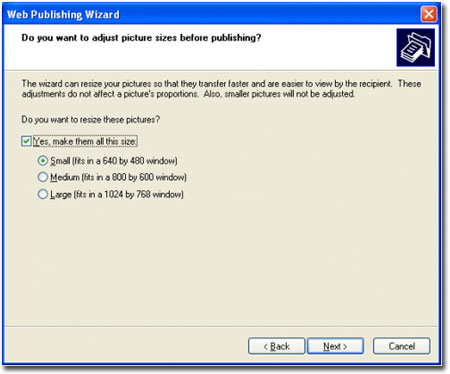
In the process of uploading your pictures using this tool, the last step will ask you if you want to resize your images and if so, to what size.
It will look like this:
I usually shoot the biggest clearest images I can with my camera and forget about the file size, then using this XP tool to upload I say 'yes' I want to resize and choose the option for 'large' images. Usually if your images are in the 2.5-3MB range (which they likely are with a new camera) the tool will resize them down to around 200k or so, while retaining the original crispness and clarity of the original photo.
You don't have to resize your images when uploading to eBay or other freebie sites because they don't give you the option to use a large clear photo, they resize everything uploaded to them automatically so even if your originals are nice and big and clear, you'll usually end up with a much much smaller somewhat grainy image after they hack them up upon upload.
If you have any trouble with getting this setup please let us know, were more than happy to walk you through this process in greater detail.