
Checkout Migration Instructions for Vendio Classic
(Sales Manager Merchandising and Inventory Edition)
As has been previously announced, starting July 1st of this year, eBay will require that all transactions go through eBay Checkout, instead of through other, third-party Checkout systems. If you have been using Vendio Checkout, you can take steps now to migrate to eBay Checkout:
Various Site Settings and Business Practices
First, make adjustments to your various site settings and business practices to ensure that eBay Checkout will work the way your Vendio Checkout currently does:Buyer Payment Settings
| If you... | Then make sure to... |
|---|---|
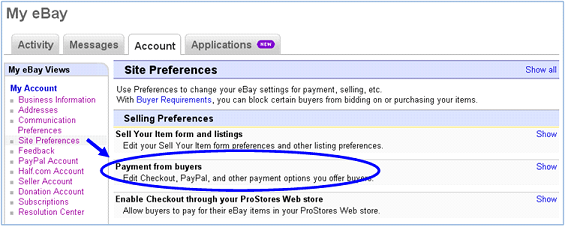
| Currently accept and automatically process credit cards (separately from PayPal) in Vendio Checkout through a merchant account and payment gateway, AND you want to continue to do so when buyers go through eBay Checkout. |
Set up your merchant account details on eBay directly, to enable eBay to send transaction details directly to your payment gateway:
|
| Currently accept payments through PayPal in Vendio Checkout AND you wish to continue to do so when buyers go through eBay Checkout. |
Check with Paypal to release any restrictions on your account that will block payments submitted through eBay checkout. Some Vendio accounts may have a setting enabled at Paypal known as the "Superblock" or "PFEI" Setting. Since this setting cannot be accessed online, you should contact your PayPal account representative to have the block released.
NOTE: Vendio will work with PayPal to ensure all of our customers' PayPal accounts have had their Superblock/PFEI setting turned off by early April. There is no need for you to take any action unless you want to transition off of Vendio checkout prior to this date.
|

Shipping Settings
| If you... | Then make sure to... |
|---|---|
| Currently use FedEx Calculated shipping rates. | Change your shipping strategy to use a different carrier or use a flat-rate method, because eBay does not yet support FedEx calculated shipping in their checkout. |
Then, to start using eBay Checkout on your listings newly launched from Vendio going forward:
Vendio Settings
| Vendio Setting | Where to find it: |
|---|---|
| Set your Checkout Redirect setting to NOT use Checkout Redirect. This will ensure that listings launched going forward will NOT redirect to Vendio Checkout from the eBay Checkout link. |
In My Account > Post Sale Management, Vendio Checkout section - UNcheck the box for "Use eBay Checkout Redirect". 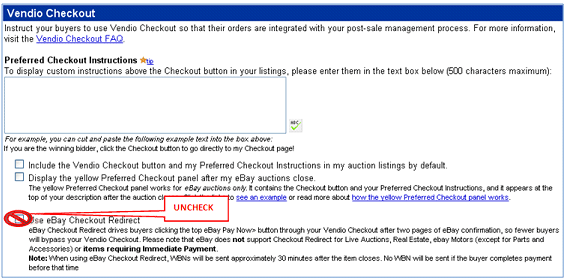
|
| eBay Setting | Where to find it: |
|---|---|
| If you offer combined OR promotional shipping discounts, you should update your eBay Settings to reflect your business needs. | In My eBay > My Account select Site Preferences, then update your shipping preferences: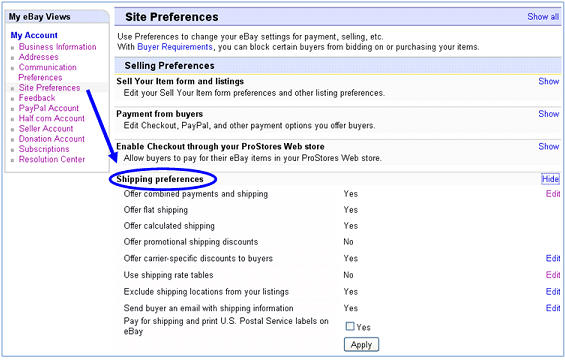 |
If you want to change all existing in-flight live listings in a more expedited timeframe, please contact our customer support team so we can work with you to accomplish this.
If you have any other questions or concerns about migrating to eBay Checkout, please contact us.
back to top